NibbleSecure PRO - WP 2FA Login Security, Heuristic Malware Detection, Hide Login & Brute Force Protection
Security down to the smallest detail.
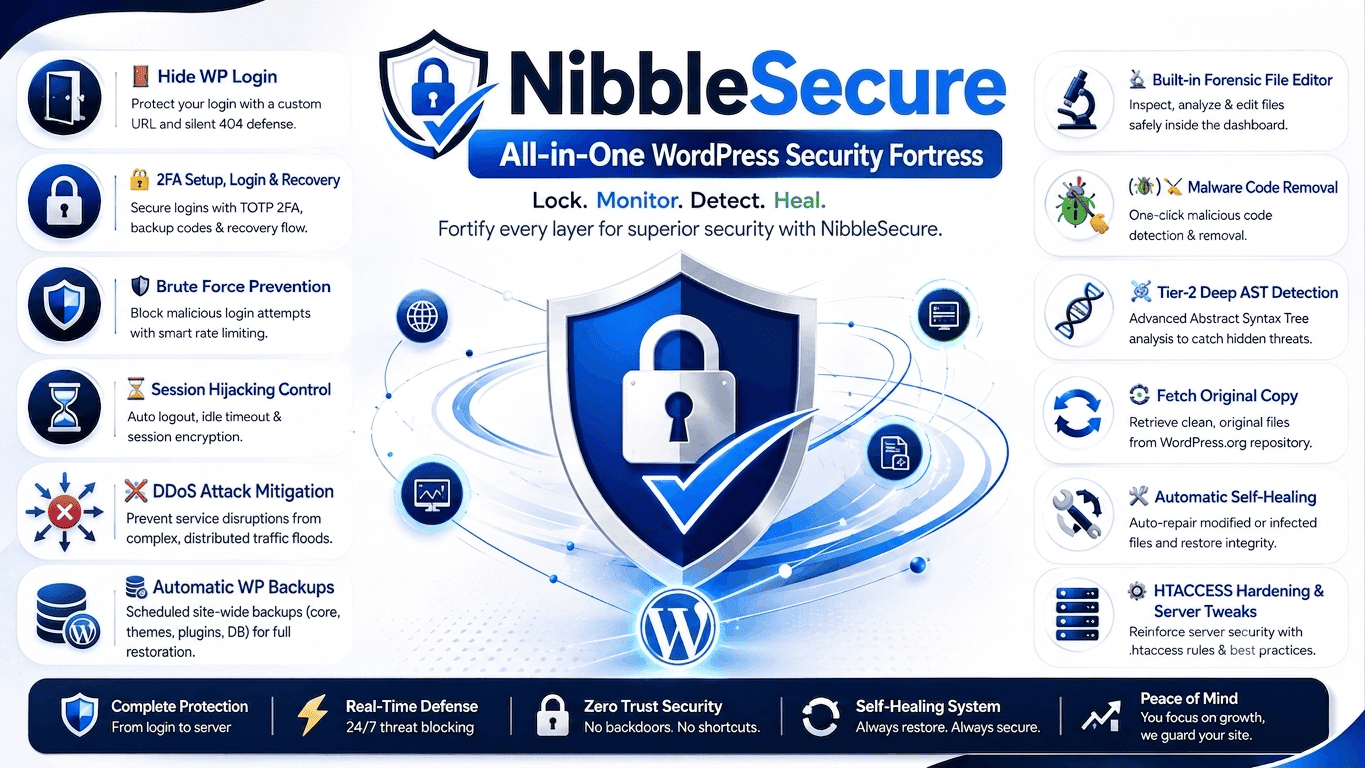
Protect your WordPress website with built-in Two-Factor Authentication (TOTP), secret login URL protection, brute-force prevention, tier-2 AST deep inspection malware scanning, file integrity monitoring, and one-click self-healing remediation.


Why WordPress Admin Security Matters
WordPress powers over 40% of websites worldwide, making it a common target for hackers, bots, and brute-force attacks.
Attackers frequently target the default WordPress login page using:
- Brute-force login attempts with automated password dictionaries
- Fake bot traffic and credential stuffing attacks
- Malware injections through compromised credentials
- XML-RPC exploits to bypass standard authentication
- Unauthorized admin access via stolen passwords
Without proper WordPress login security, your website may face malware infections, data theft, spam attacks, SEO damage, slow performance, and complete unauthorized access.
NibbleSecure helps secure your WordPress login page, admin dashboard, authentication system, and website files with advanced login protection, bot blocking, malware monitoring, and WordPress hardening features.
What is NibbleSecure PRO?
NibbleSecure is an all-in-one website security suite that protects your site from the smallest security weaknesses to major threats, including malware, brute-force attacks, unauthorized access, and server-level attacks.
NibbleSecure is a clean, powerful WordPress security plugin that acts as a turnkey solution, delivering enterprise-level security features to keep attackers and intruders completely away from your website or server, all without adding unnecessary bloat.
In computing, a nibble is four bits, half of a byte. It's a small but fundamental unit of digital information. NibbleSecure takes inspiration from that idea: security should start with the smallest details. NibbleSecure provides layered protection across your website, from authentication and files to malware detection, firewall protection, hardening, and attack prevention.
It strengthens login protection, 2FA authentication security, admin access control, Application-Layer (L7) DDoS protection, malware monitoring with tier-2 AST deep inspection, and overall website hardening while maintaining fast performance and a lightweight experience.
Unlike bulky security plugins that overload your site with unnecessary features, NibbleSecure uses a lightweight, modular architecture. You can enable only the security features you need, which shields your server from traffic floods without sacrificing your page load speeds.
💡 Accessible Enterprise Security: Get enterprise-level protection for a single, nominal payment of $6.99 (Lifetime License) with no recurring subscriptions. Your purchase keeps high-grade security accessible to all WordPress users while funding the ongoing development of our free plugins.
Key Features of NibbleSecure PRO
1 Secret Login URL Protection
Hackers already know the default WordPress login URLs such as /wp-login.php and /wp-admin.
NibbleSecure lets you create a custom login URL and hide the WordPress login page from bots, scanners, and automated brute-force attacks. This greatly reduces brute-force login attempts and unauthorized access requests.
Instead of yourwebsite.com/wp-login.php, use yourwebsite.com/my-secret-login
If you ever forget your custom login URL, NibbleSecure includes a built-in email backup feature to send a copy directly to your registered email address.
2 Two-Factor Authentication (2FA / TOTP)
Passwords alone are no longer sufficient to secure WordPress websites. NibbleSecure adds built-in TOTP-based two-factor authentication compatible with:
- Google Authenticator
- Authy
- Microsoft Authenticator
- 1Password
- Other standard authenticator applications
Once enabled, users must complete a second verification step after entering their username and password. The authenticator app generates a changing 6-digit code that must be entered during login. This helps protect your account even if your password becomes known to someone else.
3 Brute-Force & 404 Scanner Detection
Brute-force attacks use automated bots to test thousands of username and password combinations. NibbleSecure continuously monitors failed login attempts and automatically restricts abusive IP addresses.
- Configurable failed login attempt limits
- Temporary IP blocking with escalating penalties for repeat offenders
- Automated 404 Scanner Detection – Instantly detects rapid-fire non-existent URL requests (vulnerabilities & backdoor probing) and issues an immediate 403 Forbidden block
- Configurable lockout durations
- Security telemetry dashboard
- Login security alerts via email
4 Emergency Account Recovery
NibbleSecure provides multiple backup recovery options to ensure you never get locked out of your own website dashboard.
- Emergency Backup Codes - Get a special list of safe codes created for you during your initial 2FA setup.
- Secure Recovery Emails - Receive a private one-time login link sent straight to your admin email box that expires safely after 15 minutes.
If you ever lose your phone or cannot get a code, just click the "I lost my authenticator device / codes" text link on your login screen. Once you sign in using your secure email link, you can easily turn off the old device setup and connect your brand-new phone.
5 Heuristic Malware Detection & File Integrity Monitor
When a brand-new or modified file is discovered, NibbleSecure reads the code using an advanced heuristic scanner funnel that looks for:
- Unreadable, obfuscated code strings (octal or hex arrays)
- Common base64 encoders
- Dangerous server-level command functions hidden inside rogue web shells
The File Integrity Monitor continuously scans your plugin directories every hour, recording a baseline cryptographic signature blueprint using secure SHA-256 hashes. If an attacker alters files, deletes core scripts, or injects unrecognized files, the monitor instantly catches the modification and sends a detailed security alert.
6 Automated Background Scanning
NibbleSecure works like an invisible, 24/7 security guard for your website. An automated background engine runs quietly every hour, checking all your directory trees and files to catch any suspicious activity before it can cause damage.
- Instant Alerts on Changes - The moment an unauthorized file is added or an existing file is modified or an existing file is deleted, NibbleSecure catches the anomaly and notifies you instantly with detailed reports.
- Flexible Cleanup Options - When a threat is detected, you are in full control: instantly delete a rogue file, easily restore a deleted/modified file to its clean state, or click "Ignore all alterations" to whitelist safe changes.
- Surgical Malware Removal - When a malware threat is detected, you can fix it safely without breaking your website by using our built-in Forensic File Editor to easily wipe out the bad code.
The plugin is smart enough to see the difference between normal WordPress updates and real hacking attacks. It updates its own signature baseline during routine plugin upgrades, keeping you safe while completely avoiding annoying false alarms.
7 Complete Core & Plugin File Protection
NibbleSecure builds a secure wall around every single core system file and installed plugin on your website. The system constantly tracks your entire file directory, making sure that unauthorized file edits, hidden modifications, or unexpected code deletions are caught and email alerts sent instantly before they can break your site.
- Signature-Based Scanning - Regex patterns catch known malware signatures, backdoors, and suspicious function calls across every file in real time.
- The Abstract Syntax Tree engine - It analyzes the actual program structure (not just text) to detect obfuscated malware that signature scans miss. Every flagged file receives a risk score and severity label so you know exactly what to handle first.
- Live Malware Definition Updates - New threat signatures and detection patterns are automatically downloaded and applied every 24 hours, keeping your protection current against the latest exploits, backdoors, and injection techniques.
- Hourly File Integrity Sentinel - A dedicated cron job scans every core and plugin file on the hour to detect unauthorized modifications, unexpected deletions, or injected malware payloads planted through cPanel, SSH, or hidden web shells. The instant a file hash mismatch or suspicious structural change is found, NibbleSecure fires an immediate email alert to the administrator and pins a high-priority notification banner directly inside the WordPress dashboard so you never miss a breach.
When the Tier-2 AST Deep Inspection Engine flags a file, it does not just report a generic threat. It pinpoints the exact structural anomaly, assigns a severity score, and drops you straight into the Surgical Code Editor so you can see the obfuscated payload with your own eyes and fix it immediately — no FTP, no cPanel, no downtime.
8 Interactive Forensic File Editor
Removing malware code from infected files has never been so easy. This built-in visual editor makes file cleanup easy by using the 🔬 'Malware Threat Analyst View' to highlight exactly which lines of code are infected or broken and what specific malware code is hiding there.
Using this built-in visual editor you can easily remove the malware code yourself line by line, or use the 🔄 'Fetch Original Copy' tool to replace the damaged/infected file with a fresh, clean version by directly fetching the original file copy from official WordPress repositories.
9 Self-Healing Plugin Protection
Even if an attacker manages to delete or modify NibbleSecure's core files, the plugin heals itself instantly by restoring clean copies from a protected backup. It works silently behind the scenes, ensuring your security layer stays intact no matter what, so NibbleSecure stays active securing all WP core and other plugin files for you.
The self-healing system only restores core files. It does not reset your 2FA setup, custom secret login URL, brute force settings, protective firewall rules or email preferences.
10 Emergency Session Control & Auto Purge
Protects your website from hacker takeover by continuously monitoring for session hijacking attempts in the background while you are logged into your dashboard.
- Instant Automatic Kick-Out - The exact moment an extra or unauthorized device attempts to slip into your account, NibbleSecure instantly blocks the attack by logging out all other devices automatically.
- Global Device Purge - The system instantly breaks and cancels every active login cookie across the entire internet, immediately kicking out all intruders while keeping your current admin session safely connected.
- Geo-Anomaly Lockdown - The instant someone logs in from a different country that do not match your home country baseline fingerprint, NibbleSecure immediately force-resets the account password, destroys every active session on the spot, and fires two real-time emails: the first warning you of the breach, and the second delivering the new secure password so you can reclaim control within seconds.
- Manual Control Overrides - If you ever notice any suspicious activity on your site, you still have full power to manually click "Logout All Other Devices" at any time to instantly lock down your account without needing a password reset.
11 Real-Time Security Alerts
A continuous backend monitoring engine instantly dispatches high-utility email summaries to the admin for brute-force lockouts, file edits, and rogue device connections. You receive instant notifications for:
- Blocked brute-force attacks
- Blocked 404 probing attacks
- Unauthorized concurrent device logins
- Core file modifications
- Newly detected malware backdoor signatures
Our security emails do not just warn you, they give you answers. Every alert includes the exact IP address, the probable device type, and the browser information used by the attacker, helping you trace exactly where the threat came from.
12 Advanced Server Hardening & Speed Optimization
NibbleSecure injects protective rules directly into your server filesystem layer, combining maximum security with lightning-fast website performance tools.
- Server & Directory Lockdown - Instantly blocks access to sensitive hidden files like .git, .env, and backup SQL logs, while removing server headers to hide your site setup from hackers.
- Attack & Bot Filtering - Automatically blocks suspicious query web attacks and drops connection loops from malicious user agents, scrapers, and automated exploit tools.
- Block Author/User Enumeration Attacks - Returns a 403 Forbidden error on ?author=X requests to instantly stop malicious bots and scrapers from harvesting valid WordPress usernames.
- Content Scraping Protection - Returns a 403 Forbidden error on all RSS/Atom feed endpoints to instantly stop automated scrapers and auto-bloggers from stealing your full post content without ever visiting your site.
- Clickjacking & Hotlink Shield - Enforces X-Frame-Options and CSP headers to prevent your site from being embedded in malicious iframes, while slapping unauthorized sites with a strict 403 Forbidden when they attempt to directly link your images, videos, or audio files to stop bandwidth theft.
- Smart XML-RPC & Pingback Control - Offers flexible modes to block remote pingback abuse, keeping you safe while allowing essential tools like Jetpack and mobile apps to work.
- Browser Caching & GZIP Speed - Forces local browser caching and automatically compresses web data using Apache GZIP modules to slash page loading times for your visitors.
- Database & CPU Relief - Cleans up slow core emoji scripts and throttles the background WordPress Heartbeat API, slashing administrative CPU server spikes by up to 8 times.
13 Application-Layer DDoS & Flood Mitigation
Protects your website against malicious traffic spikes, automated botnets, and denial-of-service (DDoS) attempts aiming to crash your web server.
- Progressive Rate Limiting Engine - Automatically detects and throttles abnormally high request volumes from single or clustered IP addresses. Repeat offenders get their allowed requests-per-60-seconds threshold reduced further with each violation, so persistent abusers are throttled harder over time instead of hitting the same static limit.
- Bad Bot & Scraper Shield - Filters out malicious user-agents, automated scraping tools, and known attack networks before PHP execution.
- Database & Resource Protection - Prevents heavy database query exhaustion by dropping HTTP flood attacks directly at the request layer.
Each violation within the tracking window lowers that IP's rate ceiling further. A one-time traffic spike from a genuine visitor is treated leniently, while an IP that keeps exceeding limits gets squeezed progressively tighter - down to a much lower requests-per-60-seconds allowance - without needing a manual block.
Maintains site availability during high-traffic security events without degrading performance for genuine human visitors.
You do not need to touch messy server files or write code. Turn these advanced security rules on or off with simple toggle switches right inside your dashboard.
14 Schedule Automatic WP Backups
Never worry about forgetting to back up your site again. NibbleSecure automatically creates scheduled restore points in the background using WordPress's cron system, even when nobody is visiting your website. Choose how often backups are created, and NibbleSecure automatically keeps the 3 most recent restore points while removing older ones to save space.
Each backup can include your database, installed themes and plugins, uploaded files, index.php, wp-config.php and .htaccess. When restoring, you can choose which parts of your site to bring back. Before the first restore, NibbleSecure automatically creates a separate safety snapshot of your current site, giving you an extra way to undo the restore and return to your previous state if needed.
How NibbleSecure Protects Your Website
NibbleSecure uses multiple layers of website protection to block unauthorized access, prevent brute-force attacks, detect malware, and secure the admin dashboard.
1 Secret Login URL Hides Your Admin Page
By replacing the default login URL with a custom, secure login path, many attacks are stopped before they even begin. Bots and scanners simply cannot find your login page.
2 Rate Limiting & Login Protection Block Repeated Attempts
If attackers repeatedly enter incorrect passwords, NibbleSecure automatically detects suspicious activity and limits login attempts. Repeated failed logins trigger temporary IP locks, reducing brute-force attacks and automated password guessing.
3 Two-Factor Authentication Verifies Real Users
With 2FA enabled, users must verify their identity with a temporary code from their authenticator app in addition to their password. This prevents unauthorized admin access even if passwords are compromised.
4 Admin Receives Security Alerts
When suspicious activity, malware, or unauthorized file changes are detected, NibbleSecure immediately notifies administrators. Alerts help you respond quickly to login attacks, malware detection, file modifications, and security incidents.
Free vs Pro Comparison
NibbleSecure offers a robust free version and an advanced Pro version designed for businesses, WooCommerce stores, agencies, and high-traffic WordPress sites.
| Feature | Free | Pro |
|---|---|---|
| Secret Login URL Protection | ✓ | ✓ |
| Brute-Force Attack Prevention | ✓ | ✓ |
| Login Attempt Limiting | ✓ | ✓ |
| Security Email Notifications | ✓ | ✓ |
| Schedule Automatic WP Backups + Safety Current Snapshot | ✗ | ✓ |
| Application Layer (L7) DDoS Protection | ✗ | ✓ |
| Request Rate Limiting & Traffic Throttling | ✗ | ✓ |
| Session Hijacking Control | ✗ | ✓ |
| Two-Factor Authentication (TOTP) | ✗ | ✓ |
| Emergency Recovery Codes | ✗ | ✓ |
| Email-Based Account Recovery | ✗ | ✓ |
| File Integrity Monitoring ([NEW][MODIFIED][DELETED][MALWARE]) | ✗ | ✓ |
| Auto Integrity + Malware Scan Every Hour (DB+File) | ✗ | ✓ |
| Database-Level Malware & Spam Injection Scanning | ✗ | ✓ |
| Heuristic File Malware Scanner | ✗ | ✓ |
| Tier-2 AST Deep Inspection (PHP Code Syntax for Malware) | ✗ | ✓ |
| Interactive Forensic File Editor (Malware Code Removal) | ✗ | ✓ |
| One-Click File Restore From WordPress Repository | ✗ | ✓ |
| WP Core + Themes + All Plugin Files Protection | ✗ | ✓ |
| NibbleSecure Self-Healing Plugin Protection | ✗ | ✓ |
| Real-Time Concurrent Login Alerts (Auto-Purge) | ✗ | ✓ |
| Vulnerability Probe Shield (Blocks 404 Exploit Scans) | ✗ | ✓ |
| Advanced Manual Blocking (IPs, CIDR & Countries) | ✗ | ✓ |
| Block Author/User Enumeration Attacks | ✗ | ✓ |
| Geo-Anomaly Lockdown | ✗ | ✓ |
| RSS/Atom Feed Scraper Protection | ✗ | ✓ |
| Attack & Bot Filtering | ✗ | ✓ |
| Clickjacking & Hotlink Shield | ✗ | ✓ |
| Smart XML-RPC & Pingback Control | ✗ | ✓ |
| Browser Caching & GZIP Speed | ✗ | ✓ |
Which Version Should You Choose?
Choose the Free Version If You Need:
- Basic WordPress login protection with secret URL
- Brute-force attack prevention
- Two-factor authentication (TOTP)
- Emergency recovery and email-based account recovery
- Security email notifications
- Emergency session control
Choose NibbleSecure PRO If You Need:
- Enterprise-level WordPress security
- Malware scanning and heuristic detection
- File integrity monitoring with SHA-256 baselines
- One-click self-healing remediation
- WP core & plugin file shield
- Self-healing plugin protection
- Real-time concurrent login alerts
- Interactive forensic file editor
How to Install NibbleSecure PRO
Installing NibbleSecure takes only a few minutes. Follow these simple steps:
- Upload the Plugin
Upload the
nibblesecurefolder to/wp-content/plugins/, or install directly from the WordPress Plugins screen. - Activate NibbleSecure
Activate the plugin through the "Plugins" menu in WordPress.
- Open the Dashboard
Open the NibbleSecure dashboard from the WordPress admin area.
- Configure Secret Login URL
Set up your Secret Login URL protection settings if desired.
- Enable Two-Factor Authentication
Pair 2FA with your preferred authenticator app (Google Authenticator, Authy, Microsoft Authenticator, or 1Password).
- Save Recovery Codes
Save your emergency recovery codes in a secure location.
- Review Brute Force Settings
Customize your Brute Force Protection settings to match your security requirements.
Start Protecting Your WordPress Site Today
Download NibbleSecure now and secure your login page, admin dashboard, and entire website with enterprise-grade protection.
⬇ Download NibbleSecure Free ⭐ Get NibbleSecure PROFrequently Asked Questions
NibbleSecure protects your WordPress login page by requiring a secret login URL parameter. Visitors who access the standard login page without the correct parameter cannot proceed to the login form. The plugin automatically generates a unique login URL key for your site, and you can customize it at any time.
A welcome email is automatically sent right after you activate the plugin. This email contains your new custom login URL. You can also create or modify the custom login URL at any time from the plugin settings, and every time it is changed you will receive an email with the updated URL. So even if you forget it, you can simply check your email.
Once enabled, users must complete a second verification step after entering their username and password. NibbleSecure works with popular authenticator applications such as Google Authenticator, Microsoft Authenticator, Authy, and 1Password. Your authenticator app generates a time-based 6-digit verification code that must be entered during login, helping protect your account even if your password is compromised.
During 2FA setup, NibbleSecure also generates a set of backup codes. These codes allow you to sign in even if you lose access to your authenticator device or cannot retrieve verification codes from your app. We strongly recommend storing them in a secure location, such as a password manager or an offline txt file.
If you're unable to access your authenticator app and no longer have your backup codes, click "I lost my authenticator device / codes" on the 2FA verification screen.
NibbleSecure will send a secure 2FA recovery link to your registered email address. Using this link, you can disable your existing two-factor authentication and configure a new authenticator app.
For your security, the recovery link is valid for 15 minutes and automatically expires after that period.
Yes. Administrators can disable Two-Factor Authentication at any time from the plugin dashboard. Disabling 2FA removes the additional verification step from future logins.
NibbleSecure continuously monitors failed login attempts. When an IP address exceeds the allowed number of failed login attempts, the plugin automatically blocks further login requests from that IP address for a configurable period. This helps stop automated password-guessing attacks and reduces the effectiveness of brute force tools.
NibbleSecure provides continuous, dual-layer malware protection across both your files and database, combining scheduled automated scans with advanced syntax inspection.
- Hourly Automated Scans: Scans both your WordPress database and file system every hour in the background, continuously checking for unauthorized modifications, injected scripts, and compromised tables.
- Tier-2 AST Deep Inspection: Uses Abstract Syntax Tree (AST) behavioral analysis to parse raw PHP code structure. This detects heavily obfuscated malware, base64 payloads, and zero-day exploits that traditional regex-based signature scanners completely miss.
- Structural Risk Scoring: Evaluates suspicious PHP syntax by structural risk and threat severity, giving you precise insights into potential security compromises.
- Forensic Editor & Repo Restoration: Features an integrated Forensic File Editor to inspect and manually clean malicious code. For severe compromises, you can fetch and replace modified core or plugin files directly with pristine copies from the official WordPress repository.
NibbleSecure runs an automated hourly background check that monitors your entire file system for unauthorized changes, keeping track of [NEW], [MODIFIED], [DELETED], and [MALWARE DETECTED] files.
- Smart WordPress Awareness: It intelligently suppresses false alarms during routine WordPress tasks (like automatic core updates or plugin changes) so you only receive alerts when real, unauthorized file activity occurs.
- External Threat Detection: Catches suspicious file changes made outside WordPress, such as through unauthorized access via cPanel, SSH, or server file managers.
- Dashboard Status & Email Alerts: Displays specific [NEW], [MODIFIED], [DELETED], and [MALWARE DETECTED] status tags directly on your dashboard, while sending immediate email alerts whenever an anomaly, malware, or DB spam injection is found.
NibbleSecure provides real-time Layer 7 HTTP flood mitigation by combining intelligent IP rate limiting, adaptive endpoint scaling, and dynamic threat fingerprinting.
- Tiered IP Rate Limiting: Requests are tracked separately for residential visitors and hosting or datacenter IPs. Cloud and hosting IPs are subject to a stricter 50% allowance to neutralize automated attack traffic while safely allowing verified search crawlers via reverse DNS.
- Adaptive Endpoint Weighting: High-impact, uncached requests (REST API, AJAX, and search) count double against rate limits and dynamically scale up to 5x weight during targeted abuse, forcing aggressive bots to hit limits faster.
- Challenge & Escalation System: Crossing a limit triggers a JS proof-of-work challenge. Bots that fail or expire receive a Soft Block. Repeat offenders within a rolling window receive an immediate, longer-duration Hard Block.
- Botnet Fingerprinting: Dual-layer tracking catches distributed IP-cycling attacks. Fast-rotating botnets and slow-rotating datacenter clusters sharing a single browser signature skip the JS challenge and are hard-blocked immediately.
- Dashboard Status & Email Alerts: Displays specific [NEW], [MODIFIED], [DELETED], and [MALWARE DETECTED] status tags directly on your dashboard, while sending immediate email alerts whenever an anomaly, malware, or spam injection is found.
Yes. You can adjust the maximum failed login attempts before a lockout occurs, the initial lockout duration, and the additional lockout time applied to repeat offenders. These settings allow you to balance security and convenience based on your site's needs.
If you suspect your account credentials may have been exposed, NibbleSecure allows you to immediately log out all other active sessions while keeping your current session active. This helps restore account control without requiring a password reset.
NibbleSecure continuously monitors every successful login against your baseline geolocation - the country you normally log in from. The instant an unexpected login arrives from a new country, the 🛰️ Real-Time Geo-Anomaly Lockdown triggers immediately. The system force-resets your account password to a cryptographically secure 24-character string, destroys every active session on the spot so nobody stays logged in, and sends you two real-time emails within seconds: the first warning you of the breach with full telemetry, and the second delivering your new password along with new secret login URL. You then have a 5-minute grace window to log back in from anywhere and establish a fresh, clean baseline. If the attacker tries again, they are blocked permanently because the password they used is already dead.
No. NibbleSecure operates directly within WordPress and does not require external security services, subscriptions, or paid APIs to provide its core protection features.
Yes. NibbleSecure includes a dedicated 🤖 Bad Bot & Scraper Firewall that intercepts and blocks common malicious user-agents, automated content scrapers, and aggressive crawlers before they ever reach WordPress. The system maintains an up-to-date blocklist of known bad actors and instantly drops their connections at the edge. For hotlinking and bandwidth theft, the 🖼️ Anti-Clickjacking & Hotlink Shield prevents other websites from embedding your images, videos, and raw media directly on their pages by enforcing strict referrer checks and blocking direct raw-file access. It also hardens your site against clickjacking by sending the proper X-Frame-Options and Content-Security-Policy headers, so your pages cannot be trapped inside malicious iframes. Together these layers stop automated abuse, protect your server resources, and keep your website content safe from scrapers.
No. NibbleSecure is designed to be lightweight and efficient. Login protection, Two-Factor Authentication, brute force monitoring, and file integrity scans are heavily optimized and have minimal impact on normal website performance.
No. NibbleSecure is upgrade-aware and automatically recognizes legitimate WordPress plugin updates. When an administrator installs or updates a plugin through the standard WordPress update process, NibbleSecure silently refreshes its trusted cryptographic baseline to match the newly installed files, preventing false file integrity or malware alerts.
Security alerts are generated only when files are modified outside the trusted WordPress update pipeline - for example, through cPanel, FTP, SSH, hidden web shells, backdoors, malware injections, or any other unauthorized file tampering. In these cases, NibbleSecure immediately detects the integrity violation and raises a high-priority alert so you can investigate the unauthorized changes.
NibbleSecure includes an intelligent self-healing mechanism. If an attacker attempts to delete or damage the plugin folder, a lightweight must-use recovery component automatically downloads a clean, verified copy of the plugin from a secure remote backup and restores it instantly. This feature runs silently in the background and is designed to make it significantly more difficult for attackers to completely disable the security plugin.
NibbleSecure automatically creates scheduled restore points that include your database, themes, plugins, uploaded files, configuration files, and server rules.
- Background Execution: Backups run via WordPress's cron system, ensuring they run even when nobody is visiting your website.
- Granular Recovery: Choose exactly which components (database, files, or config) to bring back when restoring.
- Automatic Cleanup: The 3 most recent restore points are kept automatically, while older ones are deleted to save space.
- Pre-Restore Safety Net: A separate safety snapshot of your current site is created automatically before your first restore so you can undo changes and return to your original state.
NibbleSecure does not rely solely on WordPress login events. An hourly File Integrity Sentinel cron job scans all WordPress core and plugin files and compares their current hashes against a trusted baseline. If a file is modified, deleted, or injected with malicious code through cPanel, SSH, FTP, or a hidden web shell, the system immediately detects the structural change. It instantly sends a high-priority email alert with detailed telemetry and pins a dashboard notification so you see the incident as soon as you open your WordPress admin panel. The Tier-2 AST Deep Inspection Engine then analyzes the actual program structure of altered files to identify obfuscated malware payloads that traditional signature-based scans often miss. You can use the built-in 📝 Surgical Code Editor to remove suspicious code line by line, or click 🔄 Fetch Original Copy to restore a clean version directly from the official WordPress repositories - all without needing to access FTP or cPanel.
Yes. NibbleSecure provides a secure email-based recovery process. From the 2FA WP login verification screen, click "I lost my authenticator device / codes". A single-use recovery link will be sent to your administrator email address. The link expires after 15 minutes and allows you to disable the old 2FA configuration and enroll a new authenticator device.
Yes, the Free version is strictly mandatory. The PRO version acts as an extension pack. Follow this exact setup sequence:
- Step 1: Install and activate the standard NibbleSecure Free plugin from the WordPress repository.
- Step 2: Download your NibbleSecure PRO .zip file using the link inside your purchase confirmation email.
- Step 3: Go to Plugins > Add New Plugin > Upload Plugin and select the PRO .zip file.
- Step 4: Click install and activate. The PRO version will cleanly overwrite and replace the Free version completely.
Activation takes less than a minute. Your Transaction ID acts as your License Key:
- Check Your Inbox: Look for a confirmation email from mvpplugins.com right after payment.
- Locate Your Key: Find the unique Transaction ID string printed inside that email message.
- Download the ZIP: Use the download link provided in the email to get the PRO version.
- Activate PRO: Paste your Transaction ID into the license field inside the plugin dashboard.
Whenever an upgrade is available, mvpplugins.com will automatically send an email alert regarding the same. All future updates are 100% free of cost with your lifetime license. This notification email will contain a direct download link for the latest NibbleSecure PRO version along with step-by-step instructions on how to upload and install the file in your WordPress. Your custom configuration baselines, firewall rules, 2FA, and permanent file exclusions are stored safely in your database and will remain completely unaffected during the update process.
No. As soon as you enter your license key to activate NibbleSecure PRO features, the plugin automatically saves and locks the license to the current domain. Once locked, the same license key cannot be used to activate PRO features on any other domain. This prevents misuse and ensures that each license remains exclusive to a single website.
All sales are final, and we do not offer refunds under any circumstances. To keep our tools accessible to everyone, we have set a highly budget-friendly price point of just $6.99 for a lifetime license. While competing enterprise WordPress security options charge expensive monthly or yearly subscriptions, we deliver our advanced firewall, malware scanner, and traffic-driven self-healing engines for a small one-time payment. Because we maximize feature value at an absolute minimum price margin, we cannot process administrative chargebacks or refund requests.
Conclusion
Protecting your WordPress admin area is essential to prevent brute-force attacks, malware infections, bot traffic, and unauthorized access.
NibbleSecure combines login security, malware scanning, 2FA authentication, file integrity monitoring, self-healing remediation, emergency session control, and WordPress hardening features in a lightweight, performance-optimized security plugin.
Whether you run a WooCommerce store, agency website, membership platform, or business website, NibbleSecure helps secure your WordPress site without unnecessary complexity or performance impact.
Start protecting your WordPress website with NibbleSecure PRO today.
More from MVP Plugins
Small, focused WordPress plugins built without bloat.